
Every annual-tier Bookshelf account comes with one free author email inbox that's connected to your website domain. Whether you register a new domain through The Bookshelf or you connect a preexisting domain, you can use your provided author email to send and receive emails associated with that domain through a designated inbox provided by The Bookshelf.
If you're publishing your website under a subdomain, you won't have access to an author email inbox. You must register a new domain or connect a preexisting domain to your Bookshelf account in order to access the author email feature.
Setting Up Your Author Email
If you're registering a new domain through The Bookshelf, setting up your author email is part of that process. Visit this support page to learn more about registering a new domain with The Bookshelf if needed.
During that process, you will encounter a section called Email Configuration. The email address will automatically default to using the same domain name as you've already selected to use for your website, so you will now select the prefix portion for your email address. You will also need to select a password associated with your new author email that you will use to log into that inbox:
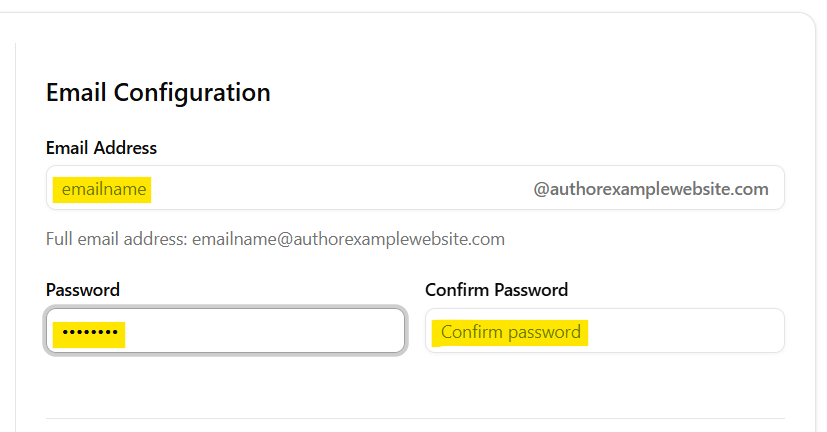
It's recommended to make your email's username portion something easily recognizable and memorable. Many authors elect to use something like their first name if they want a more personalized touch, while others may opt for something more universal such as "hello" or "info," followed by the domain name portion of their address.
If you are not registering a brand new domain via your Bookshelf account, and would instead like to transfer a preexisting domain over from wherever you currently host it, reach out to our team at support@thebookshelf.io. We'll help you with the transfer process as well as getting your associated author email inbox set up.
Accessing Your Author Email Inbox
You can access your domain's associated author email inbox by going to authormail.thebookshelf.io. You can also access this link after registering your domain and heading back to the Domain & Email tab under your account's Settings page and clicking "Log into your Mailbox":
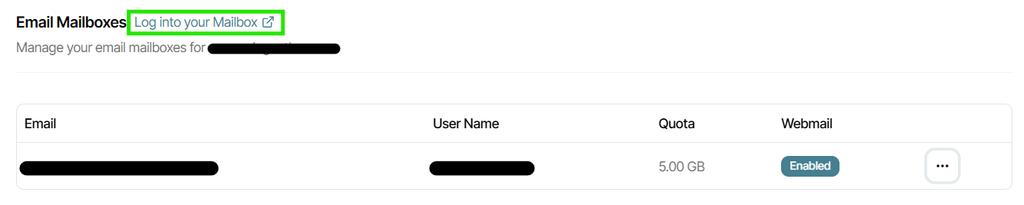
Log in at the link or directly at authormail.thebookshelf.io using the credentials you entered when originally registering your domain and creating your author email (the email address and password in the above image).
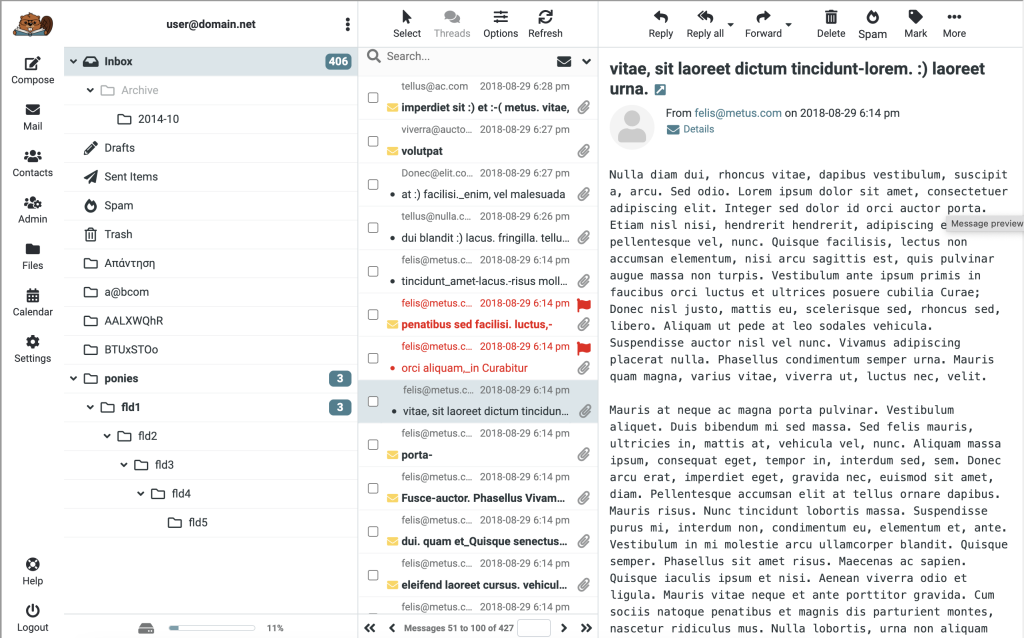
Once you've logged into your author email, your personal email interface will appear. It functions much like any webmail interface, with main options in the left-side menu such as Compose, Mail, and Contacts. Clicking these options opens new windows to the right where you can see and carry out your preferred actions.
Tips for Using Your Author Email
An email address that matches your author website domain provides a professional touch to your author business dealings. It also provides an added sense of trust for your readers when communicating with you about your books.
If you decide to use a contact form somewhere on your website (which is different from your newsletter sign-up form), it's recommended that you connect it to your author email. That way, all inquiries regarding your author business via your website are organized into a specific inbox, and you can also respond to them directly from that inbox.
You don't have to limit your use of your author email to just your website's contact form, however. For uniformity across your author brand, you can also use your email for business dealings on third-party platforms, such as your newsletter emailing platform. Just be sure to have a backup email address for purposes of accessing your various third-party accounts, as it's not advisable to use your author email as the single point of contact for all business emailing. This is because if you choose to not renew your Bookshelf account at any time, you will lose access to your author email inbox unless you decide to pay a fee to keep it operational past your cancellation date.
When you first set up your author email and access it at authormail.thebookshelf.io, it's recommended that you set up an email signature for all outgoing emails. While it doesn't need to be anything complex, a great rule of thumb is to make it consistent with what readers might find on your website itself, such as website or social media info, or even your author logo if you have one.
You may also want to bookmark authormail.thebookshelf.io in your browser for quick and easy access to regularly check your emails. Alternatively, you can opt to forward emails received at your author email to a more central email address that you check more frequently to ensure you don't miss any communication.
If you have any questions about how to set up or use your author email, feel free to reach out to support@thebookshelf.io so our team can help.